Right Hand, meet Left Hand

I am trying desperately not to use the word “stupid”, especially in conjunction with intensifiers such as “incredibly”, “unbelievably” or “predictably”.

My delightful spouse got me a new camera for christmas this year. It’s waterproof, shockproof and a bunch of other neat things. And it has wifi. So when I made some cool modifications to my printrbot, I took some pictures. And more pictures of the improved things I printed.

Then I wanted to transfer those pictures to my mac for editing, and like an idiot I thought I would do it with the camera’s built-in wifi. Well, no. First, the camera doesn’t connect to other wifi networks; it sets up its own custom network. You’re supposed to download an app to your smartphone and use it to join the custom network by scanning a QR code displayed on the camera’s screen and then download the pictures. The huge clunky desktop app supplied with the camera has never heard of wifi. It has no interest in wifi. It will work only if you pull out the SD card (shortening the life of the waterproof seal on the battery compartment) and put it in a readier, or plug in the fragile custom USB connector (shortening the life of the waterproof seal on the connector compartment).

Because it would be way too much to expect the desktop-software division of a big camera company to talk to the camera division about new features in the camera and how to support them. So my apparent only wireless option was to transfer the photos to my phone by app and thence by bluetooth or dropbox or pony express to the desktop. Um.

I did some searching, and I found out that when you join the custom network the camera is at 192.168.0.10, and that it has builtin webserver that you can reach from your desktop to look at thumbnails, and to look at or download the images one by one using the browser’s save function. But nothing about the protocol that the smartphone apps use.

A little further down the same thread, and hurrah! Same smart person has figured out a way to use *n*x command-line tools to lie to the camera’s web server and request all the files in the image directories.

Wonderful, but it doesn’t work. I go back to the camera in my browser and notice that one of the directory names is different from the one used by this guy’s camera. Try again, and bingo. Now I can crop my pictures and upload them. Maybe soon I’ll even write a script to, say, make a new directory each time labeled by date, or even to handle the wifi connection automatically.

And for those of you who have an Olympus TG-4 and haven’t already figured this out for yourselves, here is the incantation to connect to your camera from your computer and grab all the pictures (into the current directory, so be careful):

wget -q -O - http://192.168.0.10/DCIM/107OLYMP | awk -F\" '/wlansd\[[0-9]/ {print "http://192.168.0.10" $2}' | sed -E 's/(.*(JPG|MOV|AVI))(.+)/\1/' | sed 's/,/\//' | xargs wget

UPDATE: I am probably wrong about the number in the directory name. The SD card I was using was previously used in a different camera, and the *OLYMP directory is numbered one higher than the directory for the other camera’s photos. So you may have to browse to find the right number for yours.
Posted in probably boring, things that don't work | Tagged , | Leave a comment

Downcycling

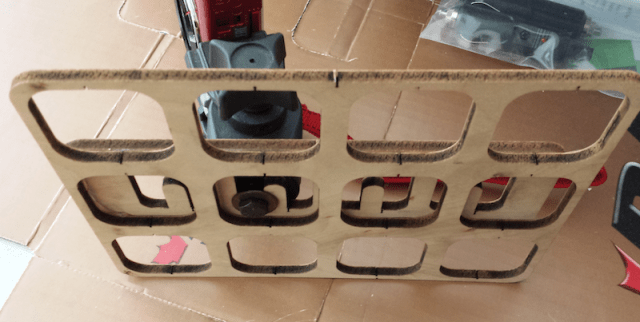
Those random pieces of plywood that had a bunch of stuff lasercut out of the middle? Save them. You never know when they might come in handy.

For example: the other day I needed to make a simple camera mount for taking closeup pictures. I could have 3D-printed a base, or used a brand-new piece of scrap lumber, but instead I had a couple of offcuts from the makerbot cupcake kit I got on clearance 5 years ago. (Yep, it really is 5 years.) A bolt and a washer from the scrap drawer — I happen to know the washer was most recently part of the 7-year-old’s previous bed — and presto.

cameramount

I think it’s kinda pretty.

Posted in making | Tagged , , | Leave a comment

Blinkinlabs Rocks

I’ve liked Blinkytape ever since it came out. Sure, you can hook up LED strips with an arduino or whatever easily, but sometimes having the controller built into the tape just makes things so much easier no wiring, no mounting, just plug and go. I got two strands of their separated pixels to decorate the tree last year (although I coded the lights myself rather than use their paint program, because images and color chases aren’t really what you want on a tree for weeks at a time). If I had an unlimited budget and any sense of sculptural aesthetics at all, I would buy several dozen of their BlinkyTile kits at least.

This year when I went to use PatternPaint again, the only computer I had to run it was the linux laptop, because my desktop mac is too old, and when the macbook is at home it’s generally running minecraft for the 11-year-old. So I followed the download-and-build instructions, which involve QtCreator — a multi-gigabyte monster of a development framework I’ve touched maybe twice before, and SPLAT. Every time I tried to change the paintbrush color from white, the program crashed. Sometimes it crashed QtCreator as well.

So after searching for possible solutions for a day or so, in the spirit of “they might as well know” I opened a new issue on Github. The next day I got a reply from Matthew Mets of Blinkinlabs saying essentially, “I can’t reproduce this on my system, try killing all the files QtCreator has made, re-downloading and see if it works.” Which I thought (being accustomed to typical software support) meant, “Something must be wrong with your system, not our problem, good luck.”

It didn’t. After I posted a reply saying “Did that, still blows up” I got instructions on running QtCreator in debug mode to generate a stack trace, and then — based on the stack traces — not one but two successive new versions of the code intended to beat the linux version of the color picker into submission. I reported late friday night that the second version didn’t blow up, got a reply saturday morning that it had also passed tests on Windows and would be pulled into the main branch of the code. (Oh, and I also found a typo that tickled a case-sensitivity issue in QtCreator; I’m a little proud that I actually figured out how to fix that on my own.)

There were so many reasons a developer could have used to blow off an issue raised by some random user completely unfamiliar with the project’s development tool, reporting an unreproducible bug with a little-used OS version. Matthew didn’t. And I think that’s pretty darn cool.

Posted in making, probably boring | Tagged , , | Leave a comment

Sometimes it’s just nice to have the right tool

It’s holiday-cookie time, and the new beater we got for our 15-year-old stand mixer didn’t fit. It went partway on the shaft and then jammed. Grr.

So this morning I went down to the basement and over to the old Harbor Freight collection of More Drill Sizes Than You Will Ever Need. Found the one that (almost) fit the hole in the top of the beater. Used it gently as a reamer for a minute or so. A few flakes of aluminum came out on the flutes. Now the beater goes on with not even a hint of binding.

Oh, and for those of you who haven’t already applied the calipers, the nominal size for Kitchenaid artisan series is half an inch.

Posted in possibly useful | Tagged | Leave a comment

More Big-Nozzle Fun

This may actually be useful for other people.

When I went to test different extrusion speeds for my 0.75mm nozzle on the Ubis13 I was concerned about how fast I could go and still have the heater keep up with the target temperature. (After my experience of being down 8-20C from target depending on speed and the details of the print in question.)

I fired up Pronterface (Octopi is still mediocre for manual control) , positioned the hotend somewhere in midair and started wasting T-glase.

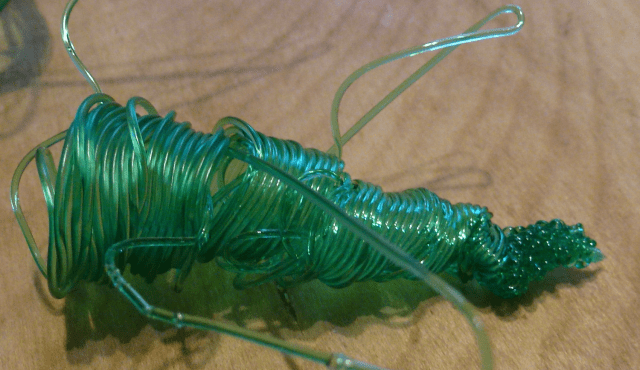
And I found something else: it seems that no matter how high I crank the target temperature (within the material’s limits), above a certain extrusion speed the heat simply doesn’t get into the filament in the same way. Or something. The filament comes out of the nozzle, starts cooling, shrinks lengthwise and immediately swells to roughly double the nozzle diameter.  It also gains a rough surface. Below that speed I get a nice glassy surface and negligible swell (a diameter of about 0.83mm).

tglasetest1

Faster extrusion on the left, slower on the right

I’m pretty sure this is about heat (although it could also be about viscosity and some sort of weird adhesion to the rim of the nozzle, because the extruded plastic does a weird side-to-side dance as it comes down). For the first few centimeters after a pause, the filament comes out glassy again, which tells me that a little bit of preheating is enough to get the plastic up to a reasonable temperature.

tglasetest2

245C, 500mm/min and up, with slight pauses

The extrusion speed for swelling to start varies a little depending on the hot-end temperature, but not as much as I might have thought. At 220C, anything above about 300mm/min of incoming filament (which my mediocre math skills translate to a free-air output of about 27mm/sec) starts getting weird. At 245C (which is as high as Taulman says is OK) I can crank the rate up to 400mm/min and still get a mostly glassy surface.

What does the swell mean for real prints? I have no idea. When I pulled on the filament as it was coming out, it stretched back down to a normal diameter (but still with the rough surface texture, and I wouldn’t want to bet against any interesting internal stress patterns). At 245C I could crank the extrusion rate up to 700mm/min (which would be somewhere about 65mm/sec for a full-thickness layer) without skipping; at 220C, skipping started around 500mm/min.

tglasetest3

This is what a stepper skip looks like feeding T-glase way too fast

I’d be interested to see the same kinds of test from a hot-end with a longer hot zone. Can you go faster and still stay glassy?tglasetest5
Also, I was a little amazed at just how tenaciously PET strands stick together when they’re hot — even just lying on top of each other after falling from the extruder makes a fairly solid bond:

Posted in making, possibly useful, Uncategorized | Tagged | Leave a comment

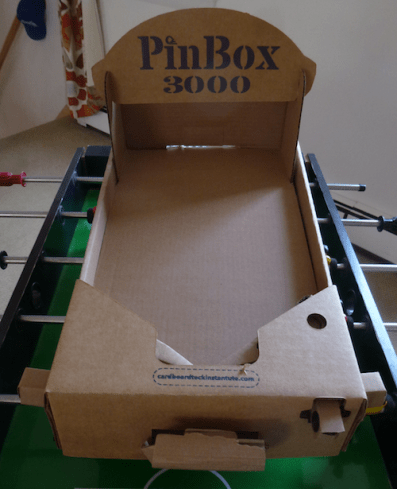
Pinbox 3000!

pinbox

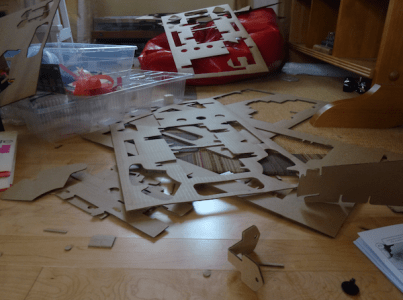
Arrived just in time for the 11-year-old’s birthday. Delightful. He’s been wanting one of his own ever since he got to play with some of the early prototypes. Takes about an hour and a half for a kid to build the basic unit (perhaps a little more if they haven’t apprenticed with Cardboard Teck, perhaps a little less).

Takes about another hour for a kid and a grownup to clean up all the little cardboard offcuts.pinbox_offcuts

And an important construction tip: to take apart a box rivet without damaging the surrounding cardboard, use two small screwdrivers (or perhaps dental hook tools if you have them. You have to pry the rivet legs apart slightly so that the serrations disengage.

We got two Pinboxes; while the kid and his friends doozy theirs up with hand-drawn art and fluffy sculptures, I’m planning to mod mine with sensors and servos and LEDs. Anybody have a good design for a laser-cut clicker-style counter?

Posted in making, toys | Tagged , , | Leave a comment

3D printer nozzle wars

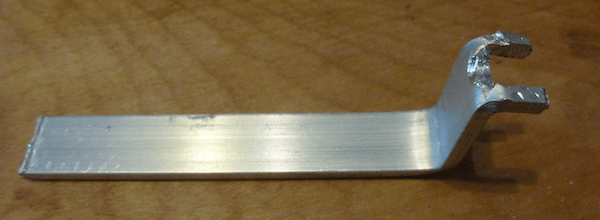
I finally got around to trying the  0.75mm nozzle on my Metal Plus. It arrived before the holiday, but I didn’t have the time to make a custom wrench for it (the flats appear to be just a hair too far apart for the quarter-inch open-end wrench I got at the hardware store).

75wrench

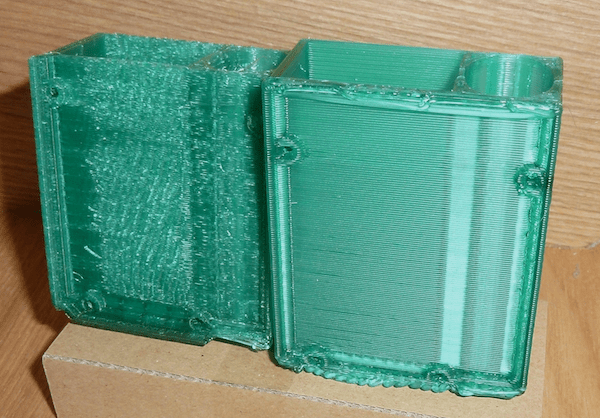
It produces a better texture on t-glase than the 0.4mm nozzle, and it prints way faster (more than doubling the layer height will do that). The lower resolution doesn’t matter for a lot of prints — like this battery-enabled bumper for an arduino clone.

75bumpers

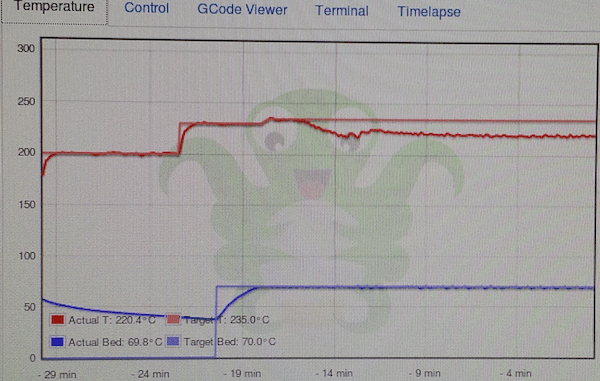
But. The PID parameters for the hot end definitely don’t have this nozzle in mind. Printing at full speed, temp was consistently 15C below setpoint (and that print eventually died with adhesion problems). I knocked back my printing speed by about 25% and got a print with the hot end only down by 7C. (In vase mode, where extrusion is even slower, the temperature was dead on. Go figure.)

75tempgraph It’s clearly not about whether the heater can keep up with the needs of the bigger nozzle (see where the temperature heads back up after dropping when serious extrusion starts). The algorithm simply has certain expectations about how much heat it has to pump into the hot end for a certain temperature increase, and they’re not being met. As the prints went forward, I could see the temperature going back up a few degrees, the PID backing off the heating rate so as not to overshoot, temp going down, repeat…
Given the big discrepancy, the dependence on flow rate, and the fact that I’m not going to be using the big nozzle all that often, I wonder whether I should spend a lot of time on tuning or just crank up the target temperatures when I need to. Any other big-nozzle dilettantes out there?

Posted in possibly useful | Tagged | 2 Comments

Belt and suspenders

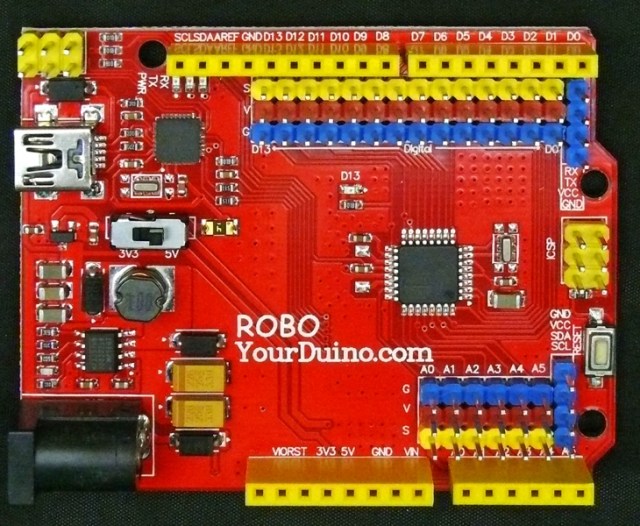
large_429_robo2front-1024I really like the idea of Yourduino’s RoboRed: gobs of 3-pin headers for almost all the arduino I/O pins, with n-tuplicated power and ground connections. Heavy-duty regulators built in for two amps of 5V and half an amp of 3V3 so you can run peripherals and servos and little motors oh my without a bunch of auxiliary power supplies.

Sort of.

I’ve been struggling to make the thing work with my new (used) laptop: just a simple sketch with a servo bipping back and forth (heaven forfend an ultrasonic sensor to give the servo a signal to track) stutters and stalls and sorta kinda works a little some of the time. Half the time the upload fails when there’s stuff attached. Was it my new laptop’s underpowered USB ports? Something hinky about USB3 under Ubuntu? Some completely implausible persistent side effect of trying to use Ardublock?

Nope. I got a sketch to upload and attached the board to a powered hub. To a USB battery back capable of delivering 3 amps. It kept stuttering, and the status LEDs kept dimming every time the servo tried to do its thing.

Aha. Somewhere on the floor amid the old pile of cables I found a half-pound wall wart with the right size plug to fit the RoboRed’s independent-power input. Zam! So it seems somehow that although it can deliver 2 amps to peripherals under the right circumstances, this board when running from a USB port has even less current available than a regular Arduino Uno. Perhaps  it’s the vagaries of the new power circuit, perhaps it’s just the fact that it doesn’t have those two big honking cylindrical capacitors  holding up the power rails under sudden current draw. Doesn’t really matter.

The question is, what to do? The whole point of the new used laptop was to be able to set up quickly to show people cute toys, even when there might not be a spare outlet handy. Down to the basement to find a nice multicell LiPo battery and a spare power plug and then maybe fab a case/bumper for it. I guess I was going to need this sooner or later…

Posted in things that don't work | Tagged , | 2 Comments

I need a better CAD program

Or to get really good at creating polygon coordinates in my head.

jrv2fan_5My new fan duct is an improvement over the old one, which was an improvement over a bare fan with a dab of packing tape. (I made something that directs the air where I want it in a nearly straight line, rather than just making a box with holes at the other end and relying on pressure to force some air out.)

But it’s still lousy because I can’t do a good job of specifying the internal duct lines. I can see them in my mind, I could even probably make them out of cardboard (not at this scale) but I can’t figure out how to specify them in Openscad. The basic shapes are fine — I just extrude some hollow rectangles in the direction I want them to go — but the details of how they intersect are lousy, and I can’t fix it without piles and piles of math.

Maybe I could import the finished shape into Meshlab and tell it “cut out these faces and replace it with a face here“, but Meshlab always scares the blazes out of me. I can seldom predict what it will do, and half the time I end up with something  so nonmanifold you have to laugh.

I know Freecad has an openscad mode, but I’m not sure it will let me do the kind of multimodal design that I want (and I haven’t been able to climb the learning curve to find out). Should I just dive in? Any other suggestions?

Posted in making, things that don't work | Tagged , | 5 Comments

Bending acrylic is easier than I thought

heater1This summer I took the little radiant space heater down from the ceiling of the woodshop — it really wasn’t doing much to keep me warm out there.  And we’ve had the scraps of a bunch of broken acrylic storage bins in the basement for 15 years, so I thought I’d finally see just what the process was like.  Just holding the  acrylic over the heater didn’t work so well — the reflector inside is designed to spread the IR out, so I ended up softening a pretty wide area. Good for some kind of complex curve you where you can clamp the acrylic in a jig, not so good for just making a corner.
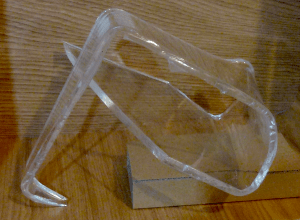
heater3So I bent up a piece of aluminum sheet to and cut a slit in it to channel the heat into a smaller area and shield everything else.. Bingo. I had to bend the acrylic a bit past 90 degrees and then hold it until it cooled, but the curve is about as tight and uniform as the factory-made ones the bin fragment had originally. Can’t wait to start playing with it to make real stuff.

As it stands, the space heater leaks a lot of heat out the sides. I might rivet on some kind of end cap, or I might just consider that a bonus for winter.

Posted in possibly useful | Tagged | Leave a comment